onClick event is not triggered on iPhone
The following code works on desktop browser but mobile one
function App() {
const [userTopics, setUserTopics] = useState<UserTopic[]>([]);
const [user, setUser] = useState<string>("");
const [currentProduct, setCurrentProduct] = useState<string>(products[0]);
const [currentAudience, setCurrentAudience] = useState<string>(audience[0]);
const draw = (
a: string[],
setFunc: React.Dispatch<React.SetStateAction<string>>,
) => {
const totalIterations = 30;
const breakpoint = 20;
let previousIndex = -1;
for (let i = 0; i < totalIterations; i++) {
setTimeout(
() => {
let newIndex = Math.floor(Math.random() * a.length);
if (newIndex === previousIndex) {
newIndex = Math.floor(Math.random() * a.length);
}
previousIndex = newIndex;
setFunc(a[newIndex]);
},
i < breakpoint
? i * 50
: 1000 + (i - breakpoint) * (i - breakpoint + 1) * 50,
);
}
};
return (
<>
<h1 className="uppercase font-black tracking-widest mb-12 sm:mb-20">
Snake Oil
</h1>
<div className="w-full h-12 mb-20 inline-flex items-center justify-start mt-12">
<input
value={user}
onChange={(e) => setUser(e.target.value)}
placeholder="Enter your name"
className="h-11 rounded-lg p-4 mr-4"
/>
<button
className="h-10 bg-gray-100 text-zinc-700 hover:bg-zinc-300 active:bg-zinc-400 duration-300 p-2 rounded-lg text-sm w-24 font-bold"
onClick={() => {
if (!user) {
alert("Please enter your name");
return;
}
setUserTopics([
...userTopics,
{ user, item: currentProduct, audience: currentAudience },
]);
}}
>
submit
</button>
</div>
<div className="w-full inline-flex space-x-3 min-h-96">
<div className="w-full h-64 text-2xl md:text-3xl font-bold tracking-wide">
<h2 className="mb-3">Product</h2>
<div className="w-full h-full bg-zinc-900 rounded-lg flex items-center justify-center font-normal md:text-xl text-lg">
{currentProduct}
</div>
<button
type="button"
className="h-8 md:h-10 bg-gray-100 text-zinc-700 hover:bg-zinc-300 active:bg-zinc-400 duration-300 p-1 md:p-2 rounded-full text-sm w-20 md:w-24 mt-6 mx-auto cursor-pointer"
onClick={() => draw(products, setCurrentProduct)}
>
draw
</button>
</div>
<div className="w-full h-64 text-2xl md:text-3xl font-bold tracking-wide">
<h2 className="mb-3">Audience</h2>
<div className="w-full h-full bg-zinc-900 rounded-lg flex items-center justify-center font-normal md:text-xl text-lg">
{currentAudience}
</div>
<button
type="button"
className="h-8 md:h-10 bg-gray-100 text-zinc-700 hover:bg-zinc-300 active:bg-zinc-400 duration-300 p-1 md:p-2 rounded-full text-sm w-20 md:w-24 mt-6 mx-auto cursor-pointer"
onClick={() => draw(audience, setCurrentAudience)}
>
draw
</button>
</div>
</div>
<div className="w-full overflow-x-scroll rounded-lg">
<UserTopicRow userTopics={userTopics} />
</div>
</>
);
}
export default App;
Change element from button to div but did not work
<div
className="h-8 md:h-10 bg-gray-100 text-zinc-700 hover:bg-zinc-300 active:bg-zinc-400 duration-300 p-1 md:p-2 rounded-full text-sm w-20 md:w-24 mt-6 mx-auto cursor-pointer"
onClick={() => {
draw(products, setCurrentProduct);
}}
>
draw
</div>
Add onTouchStart eventListener but not working
<div
className="h-8 md:h-10 bg-gray-100 text-zinc-700 hover:bg-zinc-300 active:bg-zinc-400 duration-300 p-1 md:p-2 rounded-full text-sm w-20 md:w-24 mt-6 mx-auto cursor-pointer"
onClick={() => {
draw(products, setCurrentProduct);
}}
onTouchStart={() => {
draw(products, setCurrentProduct);
}}
>
draw
</div>
Add onTouchEnd eventListener but not working
<div
className="h-8 md:h-10 bg-gray-100 text-zinc-700 hover:bg-zinc-300 active:bg-zinc-400 duration-300 p-1 md:p-2 rounded-full text-sm w-20 md:w-24 mt-6 mx-auto cursor-pointer"
onClick={() => {
draw(products, setCurrentProduct);
}}
onTouchEnd={() => {
draw(products, setCurrentProduct);
}}
>
draw
</div>
The real problem is that the buttons could not be clicked since they were blocked by the another div’s margin
- They were not covered by the parent
div
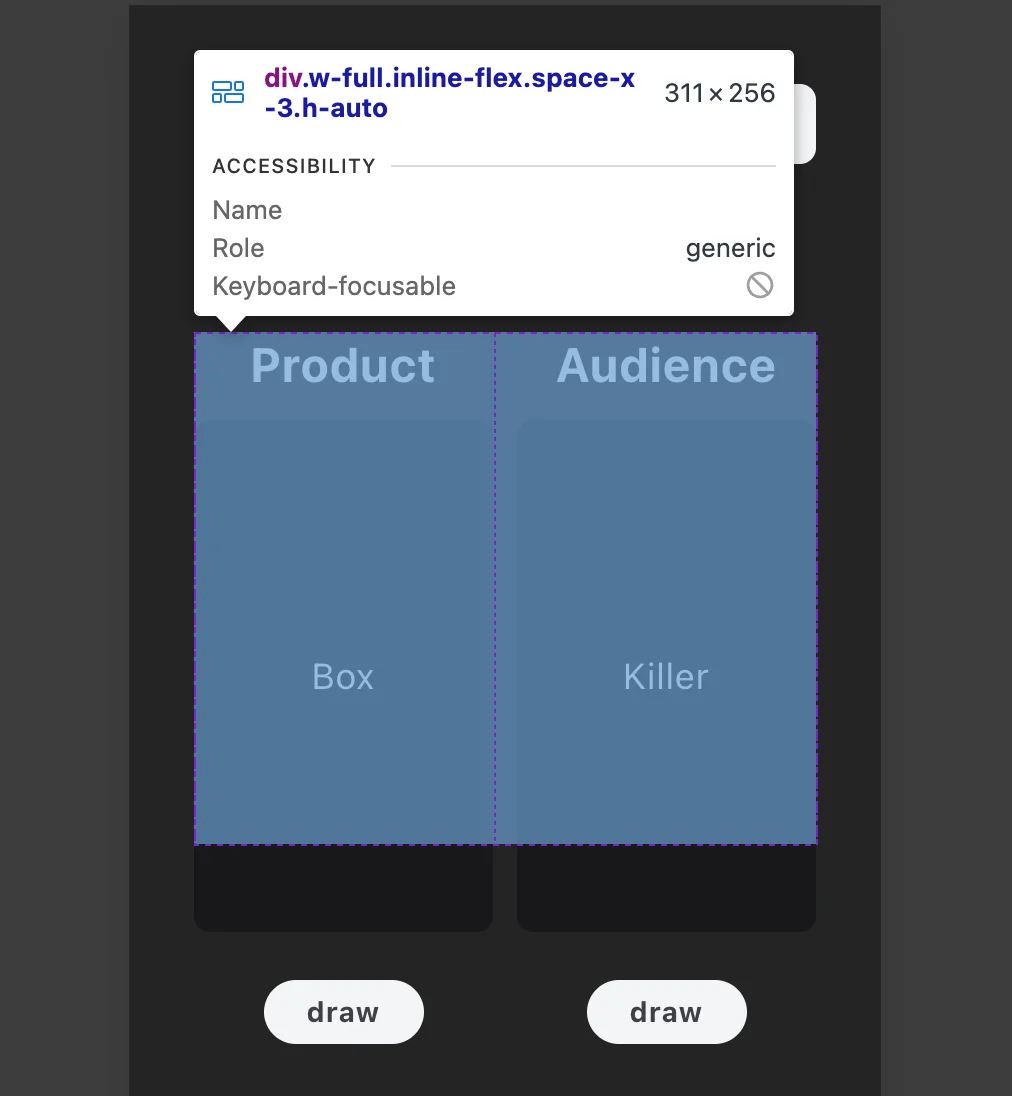
- They were instead covered by the margin of the
div below
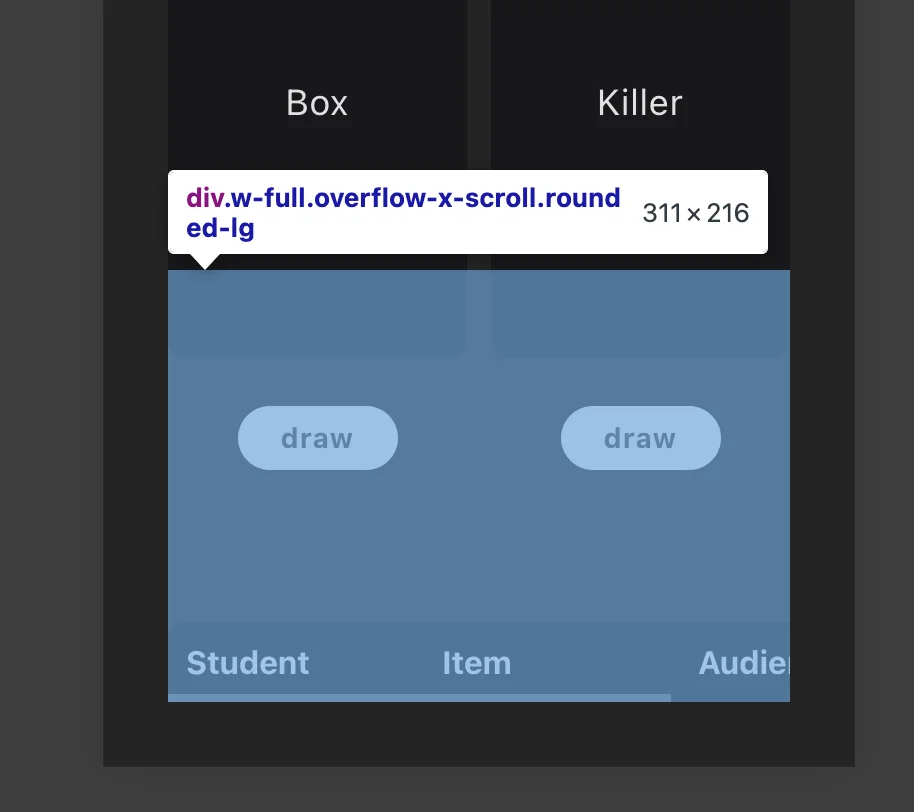
Fix it by giving the min-h-96 to the buttons’ parent div
<div className="w-full inline-flex space-x-3 min-h-96">
<div className="w-full h-64 text-2xl md:text-3xl font-bold tracking-wide">
<h2 className="mb-3">Product</h2>
<div className="w-full h-full bg-zinc-900 rounded-lg flex items-center justify-center font-normal md:text-xl text-lg">
{currentProduct}
</div>
<button
type="button"
className="h-8 md:h-10 bg-gray-100 text-zinc-700 hover:bg-zinc-300 active:bg-zinc-400 duration-300 p-1 md:p-2 rounded-full text-sm w-20 md:w-24 mt-6 mx-auto cursor-pointer"
onClick={() => draw(products, setCurrentProduct)}
>
draw
</button>
</div>
<div className="w-full h-64 text-2xl md:text-3xl font-bold tracking-wide">
<h2 className="mb-3">Audience</h2>
<div className="w-full h-full bg-zinc-900 rounded-lg flex items-center justify-center font-normal md:text-xl text-lg">
{currentAudience}
</div>
<button
type="button"
className="h-8 md:h-10 bg-gray-100 text-zinc-700 hover:bg-zinc-300 active:bg-zinc-400 duration-300 p-1 md:p-2 rounded-full text-sm w-20 md:w-24 mt-6 mx-auto cursor-pointer"
onClick={() => draw(audience, setCurrentAudience)}
>
draw
</button>
</div>
</div>